CAEX 930E: programming CPU and inverter cards in the field
Why reprogramming CPU and inverter cards matters on Komatsu 930E haul trucks, when it makes sense to do it at the mine site and how the procedure works, step by step.
The Komatsu 930E is an ultra-class haul truck with electric drive. On its website, Komatsu presents the 930E-5 as an electric drive truck with a 290-metric-ton payload, and in April 2026 it reported that the 930E is the most widely deployed model in its autonomous haulage fleet, with more than 500 units at customer sites.
The electronic components of the 930E-2 and 930E-4 models include CPU and inverter cards. When one of them is repaired or replaced, it must be programmed with its firmware before going back into the truck. This article explains why that matters, when it makes sense to do it in the field and how the procedure works.
Why reprogramming matters
A card coming back from repair, or a replacement card arriving at the mine site, is not ready to install until its firmware is loaded. If the truck is waiting for that card, programming time adds to its downtime. So in maintenance, the question is not only how to repair the card, but where and with what equipment it gets programmed.
The traditional method
Programming CPU and inverter cards the traditional way requires a simulator, diagnostic equipment, a computer and a test bench. That is fixed infrastructure, so the card has to leave the mine site to be programmed. This adds transport, coordination and waiting between the workshop and the place where the truck is.
When cards are programmed in the field
Field programming is used in three situations:
- After a lab repair, to reprogram the card before it returns to service.
- With replacement cards, to load the firmware before installing them.
- During corrective maintenance, when the failure is handled at the mine site.
In all three cases the benefit is the same: the card does not need to travel to the programming infrastructure.
The procedure, step by step
- Anti-static protection. Connect the anti-static wrist strap to the unit’s ground terminal before touching the card.
- Guided insertion. Slide the card along the rails to the main connector, without forcing it.
- Connection and selection. Establish the RS232 or USB connection and choose CPU or inverter with the selector.
- Erase and load. Erase the previous firmware with Tera Term, an open-source terminal emulator, and load the new one with wPTU, version 1.6 or later.
Before removing the card, check that the load finished without errors.
Good practices
- Electrostatic discharge (ESD) control. According to the EOS/ESD Association, a wrist strap that is properly worn and connected to ground keeps the person at ground potential. Because the person and other grounded objects are at the same potential, there can be no hazardous discharge between them. That is why the strap is connected before touching the card and stays on throughout the process.
- Preparation. Before heading out, confirm the card model, have the right firmware for it and check that the programming equipment supports it.
- One power input at a time. If the unit accepts several charging sources, use only one at a time.
- Never force the connector. The card goes in along the rails; if it does not seat, pull it out and realign it.
- Software versions. Before going to the field, confirm that wPTU is version 1.6 or later.
- Records. Note which firmware was loaded on which card and when, to keep maintenance traceable.
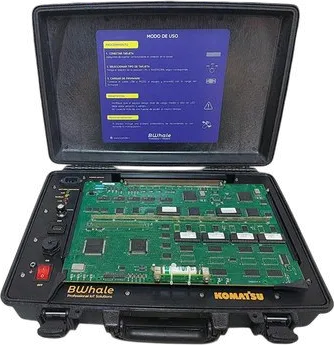
BWhale’s Configuration Panel
BWhale’s Configuration Panel takes this procedure to the field. It programs CPU cards models 144, 147, 174 and 187 and inverter cards models 172, 179 and 190 of CAEX 930E-2 and 930E-4 trucks. It comes in a Pelican 1490 case with an aluminum structure, IP64 protection and operation from −30 °C to +60 °C.
The V1 battery lasts about 2 hours in operation. V2.0 adds a built-in industrial tablet and battery for fully autonomous programming in the field.
BWhale’s mining line, which includes the Configuration Panel, the Relay Tester and the Harness Check Kit, has been sold to 10 mining companies. In August 2025, BWhale presented the line to Komatsu’s team in a product induction.